
Yes Spin
Sign Up Bonus: ₹33 Min. Withdraw: ₹100
4.4110K+ downloads
Quick Answer
Download Yes Spin from its review page on this site, allow “Install unknown apps” once for your browser, install the roughly 44 MB file, then register with your mobile number and OTP. The whole thing takes about three minutes.

By Spin Yono Editorial Team
Gaming Analyst & Editorial Team
Official game research and updates team at Spin Yono Games.
Updated
Yes Spin is a slot and spin app from the Yono family of Android games. Its catalogue is built around themed reel machines (mythology, fruit, space, festival themes), and each machine has its own bonus mini-game, so switching machines gives you a different bonus round rather than the same feature in new colours.
It is not on the Google Play Store, which is normal for this category. You install it as an APK file. That extra step is what this guide covers. If you want the app's full details first (bonus, minimum withdrawal, build size), read the Yes Spin review page.
Android only. An APK is an Android install file. There is no official Yes Spin build for iPhone, and any site offering a “Yes Spin iOS download” is sending you somewhere else.
Storage. The app is about 44 MB, but keep at least 150 MB free. Android needs room to unpack the file, and the app caches game artwork after the first launch. Most “App not installed” errors on budget phones are really storage errors.
Data. Use Wi-Fi or a stable 4G/5G signal for the download. A file that stops halfway will fail to install with a “problem parsing the package” message.
Age and location. Real-money gaming is for adults 18+ only, and it is restricted in several Indian states. Read the note at the bottom of this page before you deposit anything.
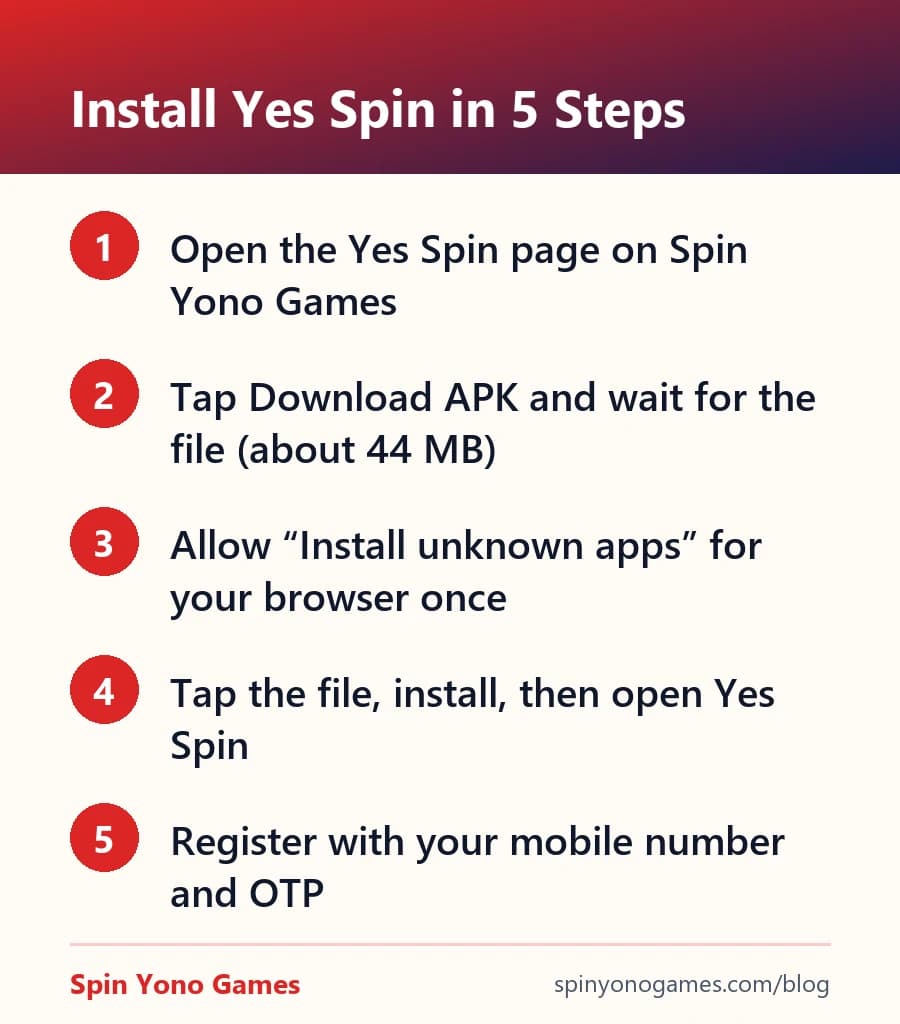
1. Open the Yes Spin page on Spin Yono Games and tap Download APK. The button links to the current version of the app.
2. Your browser may say the file “can harm your device.” This warning appears for every APK downloaded outside the Play Store. Tap Download anyway only if you started the download from a source you trust.
3. When the download finishes, tap the file. If Android blocks it, tap Settings, turn on Allow from this source for your browser, then go back.
4. Tap Install, wait a few seconds, then tap Open.
5. Register with your mobile number and the OTP sent by SMS. Your sign-up credit, if the app is running one, appears in the wallet or rewards screen.
Android treats every app from outside the Play Store as “unknown.” The warning does not mean the file is malware. It means Google has not reviewed it. Google Play Protect may also scan the app during install and show a second prompt.
The warning is a good moment to check where the file came from. If you downloaded it from a Telegram forward, a WhatsApp link or a site you have never heard of, stop and get it from a known page instead. If Play Protect says the app is harmful (not just “unknown”), do not install it.
After installing, you can switch “Install unknown apps” back off for your browser. It only needs to be on while you install.
Checking takes under a minute. Look at the file name (it should end in .apk, not .apk.zip or .exe), compare the file size with the listed build size, and look at the permissions the app asks for after it opens.
A slot app has no reason to ask for your contacts, call logs, or Accessibility access. Accessibility is the one to watch: it lets an app read your screen and tap buttons for you, and banking-fraud apps rely on it. Deny it.
Finally, remember that no real app support team will ever ask for your OTP, UPI PIN or a screen share. Our longer guide on how to verify a Yono APK is safe goes deeper on each check.
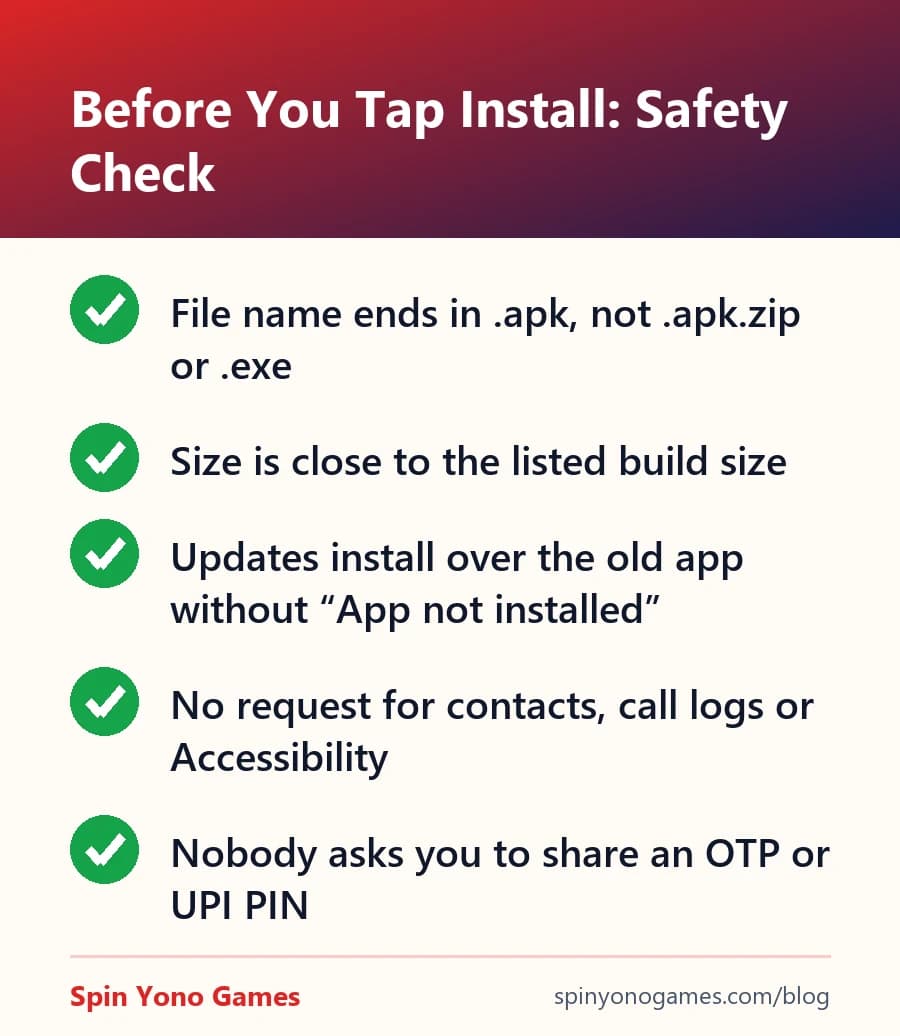
When a new version is out, the app usually shows an in-app prompt. You can also download the APK again from the same page and install it over the current app. Your balance and history are stored on your account, not the phone, so they carry over as long as you log in with the same mobile number.
If the update fails with “App not installed,” the new file may be signed differently from the one on your phone. Uninstall the old app and install the new one. Our install troubleshooting guide lists the other common causes.
If UPI cash-out matters more than chip tournaments, these apps on this site have a disclosed sign-up bonus, a stated minimum withdrawal, and a download link our editors checked themselves.
Editorial note: this guide is independent commentary, not an endorsement of any specific third-party app. Real-money gaming carries financial risk and is restricted to users aged 18+; it is excluded in Andhra Pradesh, Assam, Nagaland, Sikkim, Tamil Nadu, Telangana and Odisha. Always verify an app's own terms before depositing — report an inaccuracy.